
WORDPRESS PLUGIN · FREE · GPLv2
Your Downloads. Your Page.
Ten seconds that belong to you, not to Dropbox.
Smart Download Redirector sends links to external files through a countdown page on your own domain. You choose the wording, the layout and the colours, set a timer between one and sixty seconds, and cap how many downloads one visitor may pull. The file still comes from wherever it lives — the moment before it does is yours.
Free & GPLv2 · Three layouts, fully styleable · Signed links that survive page caching · Rate limiting built in · Tested up to WordPress 7.0

The problem: the download link is the exit door
A visitor clicks your manual, your price list, your software — and lands on Dropbox, Google Drive or a file host that has nothing to do with you. The visit is over. Worse, that raw link now travels: forums quote it, other sites embed it, and your file gets pulled a thousand times by people who never saw your page at all.
The solution: a stop on your own domain
List the domains you host files on, and every link to them runs through a countdown page you control. It carries your heading, your colours and anything else you put on that page, then forwards to the file. A signed token keeps the link valid, and a rate limit stops one visitor from hammering it all afternoon.
It is an ordinary page
The countdown is a shortcode on a page you create. Put a newsletter form, a related product or a note about the licence above it — the wait becomes useful instead of empty.
Links that keep working
Redirect links are signed with a stable HMAC token instead of a nonce, so they do not expire after a day and they survive full-page caching.
Styled down to the details
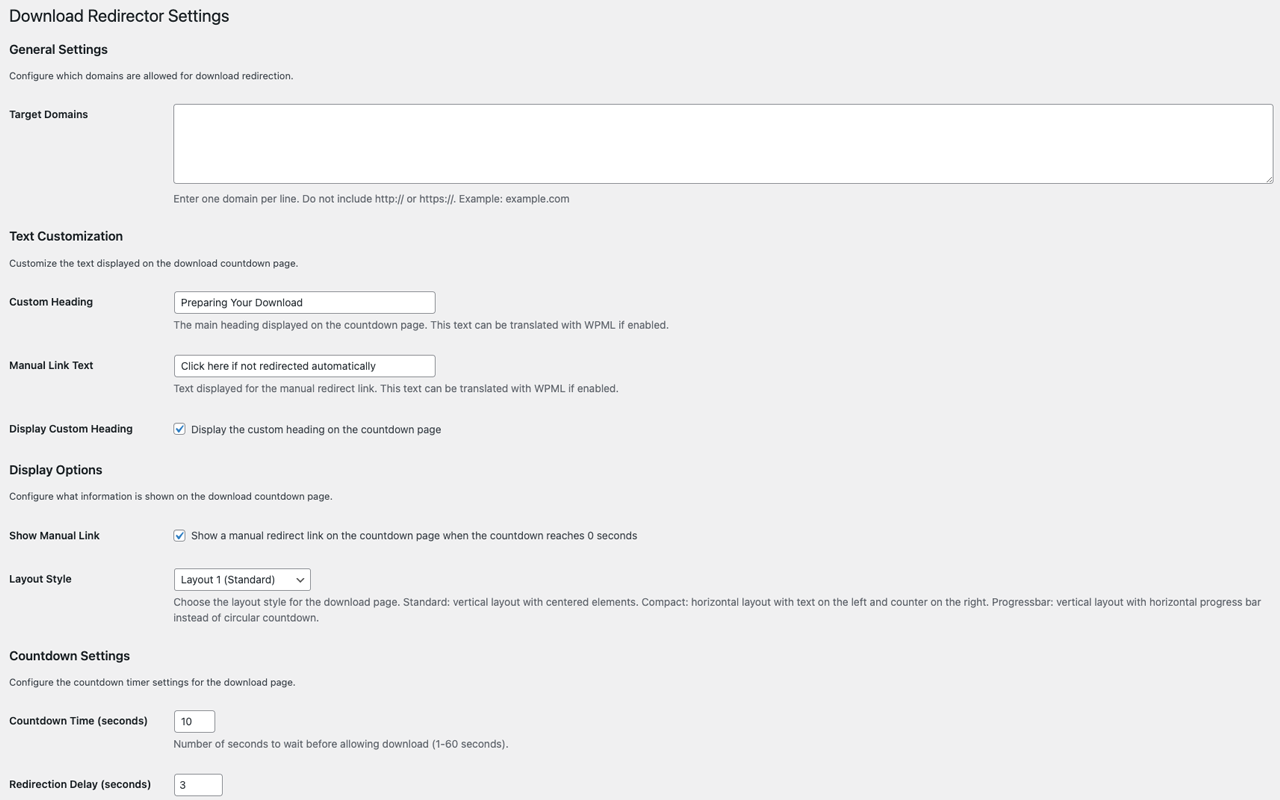
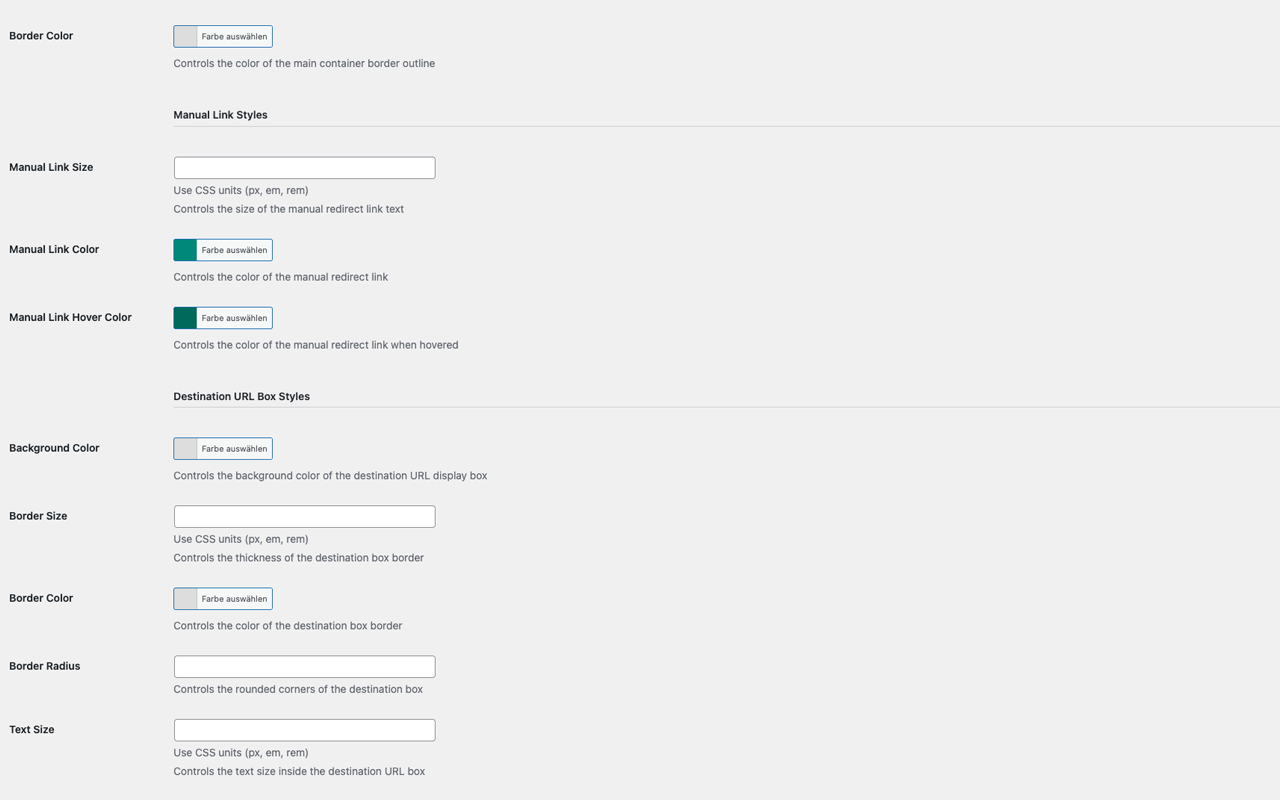
Heading, timer, container, manual link and destination box each have their own colour, size and border settings — and a reset button when you have gone too far.
Plugin features
Everything you need to route external downloads through your own page — and nothing that gets between the visitor and the file.
Domain-based targeting
Enter the domains your files live on, one per line. Links to those hosts are routed through your countdown page automatically; every other link on your site is left completely alone.
A timer you control
Anything from one to sixty seconds, plus a separate redirection delay. Long enough to be noticed, short enough that nobody leaves — and you decide where on that scale your audience sits.
Three layouts
Standard puts everything centred in a column. Compact places the text on the left and the counter on the right. Progress bar swaps the circular countdown for a horizontal bar. One dropdown, no CSS.
Your wording
The heading and the manual link text are settings — “Preparing your download”, “Your file is on its way”, whatever fits. The heading can be hidden entirely, and both strings are translatable, WPML included.
A manual link as a safety net
When the counter reaches zero, an optional “click here if not redirected automatically” link appears. Nobody ends up stuck on a page staring at a zero.
Styling for every element
Separate settings for the heading, the countdown number and ring, the main container, the manual link and the destination URL box — colours, sizes, borders and radius, with a colour picker throughout.
Rate limiting with sensible presets
Cap how many downloads one visitor may request per fifteen minutes, hour or day. Presets of 10, 50, 100 and 500 come with plain-language guidance on which suits a small site and which suits a busy one.
Signed, cache-friendly links
Since 1.0.1 the redirect is protected by a stable HMAC token rather than a WordPress nonce. Links stay valid indefinitely and work on pages served from a full-page cache.
Security headers on the request
The countdown request is sent with protective headers, and the destination is validated against your domain list — a link that was tampered with does not resolve.
Tidy on the way out
Two reset buttons put styles or all settings back to their defaults, and uninstalling removes every option and transient the plugin created. Nothing lingers in your database.
What people use it for
Software & digital products
Installers and archives that live on a CDN or a file host, but should still feel like they come from you — with version notes and a licence reminder on the way.
Course and membership files
Worksheets and slide decks stored outside WordPress. The countdown page is the moment to point at the next lesson instead of losing the visitor to a cloud drive.
Manuals & technical documents
Data sheets and instructions that get linked from forums for years. Routing them through your own page means the traffic arrives where you can see it.
Agencies delivering to clients
Assets handed over from external storage, wrapped in a branded page rather than a bare share link — a small thing that changes how the handover looks.
Live in three steps
- Install and activate the plugin from the WordPress plugin directory.
- Create a page — “Download” works well — and add the shortcode
[smartdr_download_countdown]. - Open Settings → Download Redirector, list your file domains, set the timer and the styling.
From then on, matching links are routed automatically — existing posts included. Nothing in your content has to be rewritten, and removing a domain from the list switches it back off.
Technical details
| Version | 1.0.1 |
| WordPress | 6.8 or higher |
| Tested up to | 7.0 |
| PHP | 7.4 or higher |
| Settings | Settings → Download Redirector |
| Shortcode | [smartdr_download_countdown] |
| Countdown | 1–60 seconds |
| License | GPLv2 or later |
Screenshots


What it is — and what it isn’t
Smart Download Redirector is a routing and presentation layer for links that point at files somewhere else. It keeps the click on your domain, gives the moment before a download a shape you designed, and limits how often one visitor may trigger it. For anyone handing out files from a cloud drive or a CDN, that is a real gain in control and in polish.
It is not file protection. The countdown page ends by sending the visitor to the destination, and the destination is shown on the page — anyone who wants the raw URL can read it. What routing does is stop other sites from linking straight past you, and give you a rate limit against automated hammering. Files that genuinely must not be shared belong behind authentication, not behind a countdown.
And a word on the timer: the wait is a cost you charge your visitor. Ten seconds with something worth reading on the page is a fair trade. Sixty seconds of empty screen is how you teach people to look for a mirror. Set it as short as your purpose allows.
Frequently asked questions
How do I add a countdown before a download in WordPress?
Install Smart Download Redirector, create a page and put the shortcode [smartdr_download_countdown] on it, then list the domains your files come from under Settings → Download Redirector. Links to those domains are routed through the countdown page from that point on — no link in your content has to be changed.
How long can the countdown be?
Between one and sixty seconds, with a separate redirection delay on top. Ten seconds is a common choice; anything much longer only makes sense if there is genuinely something on the page worth the wait.
Which links get redirected?
Only links pointing at the domains you list in the settings, one per line and without http:// or https://. Everything else on your site is untouched.
Can I put my own content on the countdown page?
Yes — it is an ordinary WordPress page holding a shortcode. A newsletter form, a related product, installation notes or a licence reminder can all sit above or below the countdown, built with your normal blocks.
Does it work with caching plugins?
Yes. Since 1.0.1 the redirect links are signed with a stable HMAC token instead of a WordPress nonce, so a cached page keeps working and links no longer expire after roughly a day.
What does rate limiting do?
It caps how many download requests one visitor may make within a chosen window — fifteen minutes, an hour or a day. Presets of 10, 50, 100 and 500 are offered with guidance: tighter for small sites, looser for high-traffic ones.
Does this hide or protect my files?
No. The page forwards to the destination and shows it, so the underlying URL stays readable. Routing discourages other sites from linking past your page and rate limiting blunts automated abuse — but genuinely confidential files need real authentication.
What happens if the redirect fails?
An optional manual link appears when the counter reaches zero, so the visitor can start the download themselves instead of waiting on a stalled page. You can set its wording and its colours.
Can I translate the countdown page?
Yes. The heading and the manual link text are translatable strings and can be handled with WPML, so a multilingual site shows each visitor the right wording.
Is Smart Download Redirector free?
Yes. It is published in the official WordPress plugin directory under GPLv2 or later, with no paid tier and no upsell inside the plugin.
Changelog
1.0.1
- Changed: redirect links are protected with a stable signed HMAC token instead of a WordPress nonce — they no longer expire after about a day and work with page caching.
- Fixed: rate limiting is now actually enforced on the countdown page, and security headers are sent with the request.
- Fixed: URLs are no longer rewritten to force a “www.” subdomain, which could break valid download links.
- Fixed: the countdown could initialise twice and run too fast on already-loaded pages.
- Improved: PHP 8.1+ compatibility, fewer database writes, and uninstall now removes every option and transient. Tested up to WordPress 7.0.
1.0.0
- Initial release: domain-based redirection through a customisable countdown page, with timer, layout, styling and rate limiting settings.
Keep the click on your domain
Free, GPL-licensed, and set up in three steps from the WordPress plugin directory.
Version 1.0.1 · GPLv2 or later · Desk9 Design